Blog
This Boring Policy is Insanely Important
The file-naming convention you should implement to save time and avoid headaches.
I worked at a firm where an intake team would collect documents and dump them into case folders, keeping whatever filename was on the document when it was received. Then, whenever someone needed to review the case, they would spend an hour opening each document to determine what was in the case file. That time adds up. Imagine if a client file had accidentally slipped into the wrong folder. That file would be as good as gone.
This isn't housekeeping, it's infrastructure, time, and money. Properly name your damn files. It's not hard.
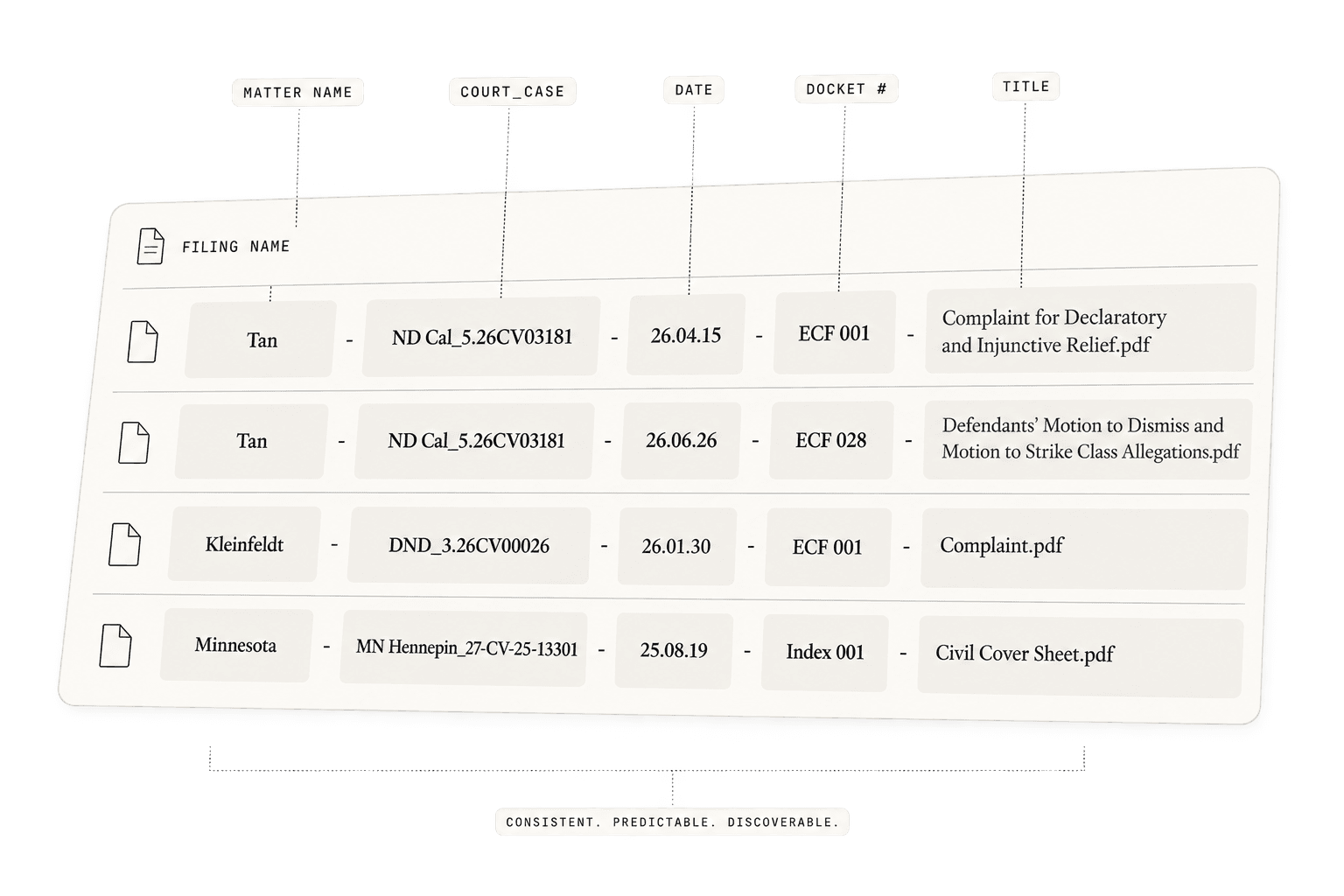
A proper naming convention answers the same five questions before the file is even opened: Whose case is this? What court is it in? What case is it? When was this document filed? Where does it sit on the docket? And, finally, what is it?
It is not glamorous. Neither is a Bates number. Both become considerably more attractive the first time you need the right document in twelve seconds.
1. Start with the client's name
The first field is the short matter identifier: “Kleinfeldt,” “Tan,” “Minnesota.” This is deliberately human, not ceremonial. You don't need the full caption every time you look at a file; you need to know immediately which matter owns it.
Kleinfeldt - DND_3.26CV00026 - 26.01.30 - ECF 001 - Complaint.pdf
That matters more once files leave their home folder. Attach a PDF to an email, copy it into a research folder, drop it into an exhibit set, or find it six months later through Windows search, and “ECF 028.pdf” has lost its meaning; “Tan … ECF 028” or “Kleinfeldt … ECF 001” has not.
2. Court + case number: enough identity to survive outside the folder
Next comes the court and the case number, joined as a single identity block. Federal district courts use a short, standardized court abbreviation. A comprehensive list of court names and abbreviations can be found here or this for quick reference. By default, the abbreviations use periods to separate letters (“W.D.” for “Western District”) or end the abbreviation (“Mich.” for “Michigan”). It is entirely acceptable to omit the periods when naming your files (and you should). Case in the District of North Dakota? Use “DND.” Northern District of California? Use “ND Cal.” And so on.
Tan - ND Cal_5.26CV03181 - 26.06.26 - ECF 028 - Defendants' Motion to Dismiss and Motion to Strike Class Allegations.pdf
The court name is followed by a filename-safe version of the case number: 5:26-CV-03181 becomes 5.26CV03181. The colon is replaced by a period because the colon is a reserved character for core operating system functions and cannot be used in filenames. Removing hyphens inside the federal case number reduces visual noise and filename length. “CV” is capitalized. Leading zeroes stay put. The result is compact, readable, sortable, and still instantly recognizable to anyone who works with federal dockets.
Judges can change throughout a case, so do not include their initials. This file naming convention creates an inherent chronology that works within all operating systems because everything up until the date (in YY.MM.DD format) is identical. If you were to include a judge's initials and the judge changed, it would break the inherent chronology of the files.
3. Date in YY.MM.DD format is the secret sauce
The filing date is next and it must be in two-digit year, two-digit month, and two-digit day (YY.MM.DD) format. For example, August 3, 2024 would be “24.08.03.”
Because everything up to the date is identical, having the date in this format ensures that your files will always be chronologically ordered. Using periods to separate the numbers is a stylistic choice (there’s no reason a hyphen wouldn’t also suffice), but the strict two-digit format ensures no files sort themselves out of place.
Zero-padding is not cosmetic. Without it, alphabetical sorting breaks chronology: October (10) sorts before August (8), and the 10th sorts before the 2nd. YY.MM.DD makes ordinary filename sorting behave like a calendar.
If you wrote months without leading zeroes:
24.8.03 - August 3
24.9.03 - September 3
24.10.03 - October 3
24.11.03 - November 3
A filename sort would produce:
24.10.03 - October 3
24.11.03 - November 3
24.8.03 - August 3
24.9.03 - September 3
because “1” sorts before “8” and “9.”
The same problem occurs with days. Suppose you used YY.MM.D:
Chronologically:
24.08.2 - August 2
24.08.3 - August 3
24.08.9 - August 9
24.08.10 - August 10
24.08.11 - August 11
A filename sort would instead give:
24.08.10 - August 10
24.08.11 - August 11
24.08.2 - August 2
24.08.3 - August 3
24.08.9 - August 9
Again, the computer compares the first character after 24.08.__ — “1” comes before “2”, “3”, and “9.” Also, without the strict two-digit structure, the filenames don’t align neatly.
That is why:
24.02.09
24.02.10
24.10.02
24.10.11
works perfectly.
4. Quick interlude
The matter name and the court case sections will always be identical. The date is the first time anything is different. This is intentional. If you have an email that needs to be saved in the case folder, then copy the format through the date and label the email:
Tan - ND Cal_5.26CV03181 - 26.01.18 - Email - Conferral RE Motion Ext of Time.pdf
This way, the inherent chronology is maintained.
5. Docket identity
In federal court, document identity is “ECF ###.” If your particular matter is not in the federal system, then use the appropriate docket abbreviation; the court’s own nomenclature controls. Again, we use a preset, strict three-digit number (008, 064, 119, etc.) to keep the visual field consistent and the sorting clean. More importantly, attachments remain attached conceptually: ECF 001-1 is obviously an attachment to ECF 001, not some mysterious neighboring filing.
6. The Goldilocks title: concise but actually useful
The final substantive field is the document title. Use a shortened version of the document title. It needs to be shorter than the twenty-seven-word CM/ECF event description, but not so short as to be ambiguous—“Motion” ain’t gonna cut it. Use the shortest accurate title that would let another member of the firm identify the document without opening it.
“Complaint” and “Answer” are sufficient because there is often only one of each. Apart from unique documents, the title should be descriptive enough to prevent someone from having to open it to find out what it is. Make the title useful.
This is where a good convention becomes more than a sorting scheme. The folder itself becomes a rough procedural history. Scroll down the file list and you can see the litigation develop.
Often firms have a shorthand or set of abbreviations that can reduce the filename length. For example, a “Motion to Dismiss” may be reduced to “MTD.” Make sure everyone is on the same page, though—a “Motion to Continue” and a “Motion to Compel” could both be “MTC.” If you have a firm-wide shorthand, make sure it’s written somewhere that can be readily referenced.
7. Be intentional with the punctuation and spacing
The separators are intentionally boring: space-hyphen-space between major fields, one underscore between court and case number. That gives the filename a visual cadence.
Matter - Court_Case - Date - Docket Number - Title.pdf
A person can scan it. A script can parse it. A first-day intern can reliably rename and classify it. Search tools can find it. And nobody has to remember whether this particular folder used underscores, camelCase, consecutive hyphens, or the naming instincts of whoever happened to download the document.
8. The folder rule matters just as much
The convention works because the root matter folder is equally disciplined. The downloaded court documents—properly named—stay in the root. So does the principal memorandum I create for the matter. Everything else goes into support folders such as _Project, _Research, _Working, and _Source Archives.
It's boring; do it anyways.
Most naming systems optimize for one thing: the person naming the file. This one optimizes for everyone who will ever have to find it again.
It is human-readable without being verbose. Chronological without having to think about it. Docket-aware without requiring a separate lookup. Stable across judicial reassignment. Adaptable across federal and state courts. Searchable outside the original folder. And sufficiently rigid that two people should produce the same filename for the same document.
That last point may be the real advantage. A naming convention is valuable only when it stops being a preference and becomes a rule. If every file answers matter, court, case, date, docket position, and identity in the same order, the filesystem starts functioning like a lightweight case database without requiring anyone to maintain another database.
Could I have spent less time thinking about file names? Absolutely. I also could have called everything “Motion_CT-FINAL_draft3_FINAL2.pdf” and embraced the chaos.
Instead, I can open a folder containing more than a hundred filings and understand the record before opening a single one. Time is money, right?